For social media managers and small agencies

From client brief to scheduled post.

Keep each client's brand guidelines alongside their content and calendar. Generate captions and images from a brief, review your edits, and choose when to publish.

See pricing and plan availability

Different clients. Different voices. The work repeats every week.

Finding brand instructions, preparing captions and images, and moving content into a calendar adds steps to every post. Castiva brings that work into each client's workspace.

A closer look

One workflow. A different voice for every client.

Choose a sample client to follow a brief through content review and scheduling.

Explore a client workspace

Sample walkthrough

Start with the client

Save the brand guidelines, then describe what this post needs to say.

Green Bowl CaféNeighborhood café
Tone of voice
Warm, local, welcoming.
Keep in mind
Seasonal ingredients. No discount claims.
Brand colors
#345442#D9A15B#EDF2E9
Your brief

Introduce our autumn menu, launching Friday. Invite neighbors to stop by.

Make the draft yours

Use AI to draft a caption and image. Check the details and make your edits.

Example caption

Our autumn menu arrives this Friday. Seasonal flavors, familiar faces, and a reason to linger over lunch.

Your final edit

Come and try it. See you at your usual table.

Choose when it goes live

Pick the connected account and posting time. Keep the post in this client’s calendar.

Green Bowl CaféCalendar
Mon14
Tue15
Wed16
Thu17
Fri18
Friday 18 · 18:30
The autumn menu is here

See you at your usual table.

Instagram Scheduled

You decide what gets published and when. Generating a draft does not publish it.

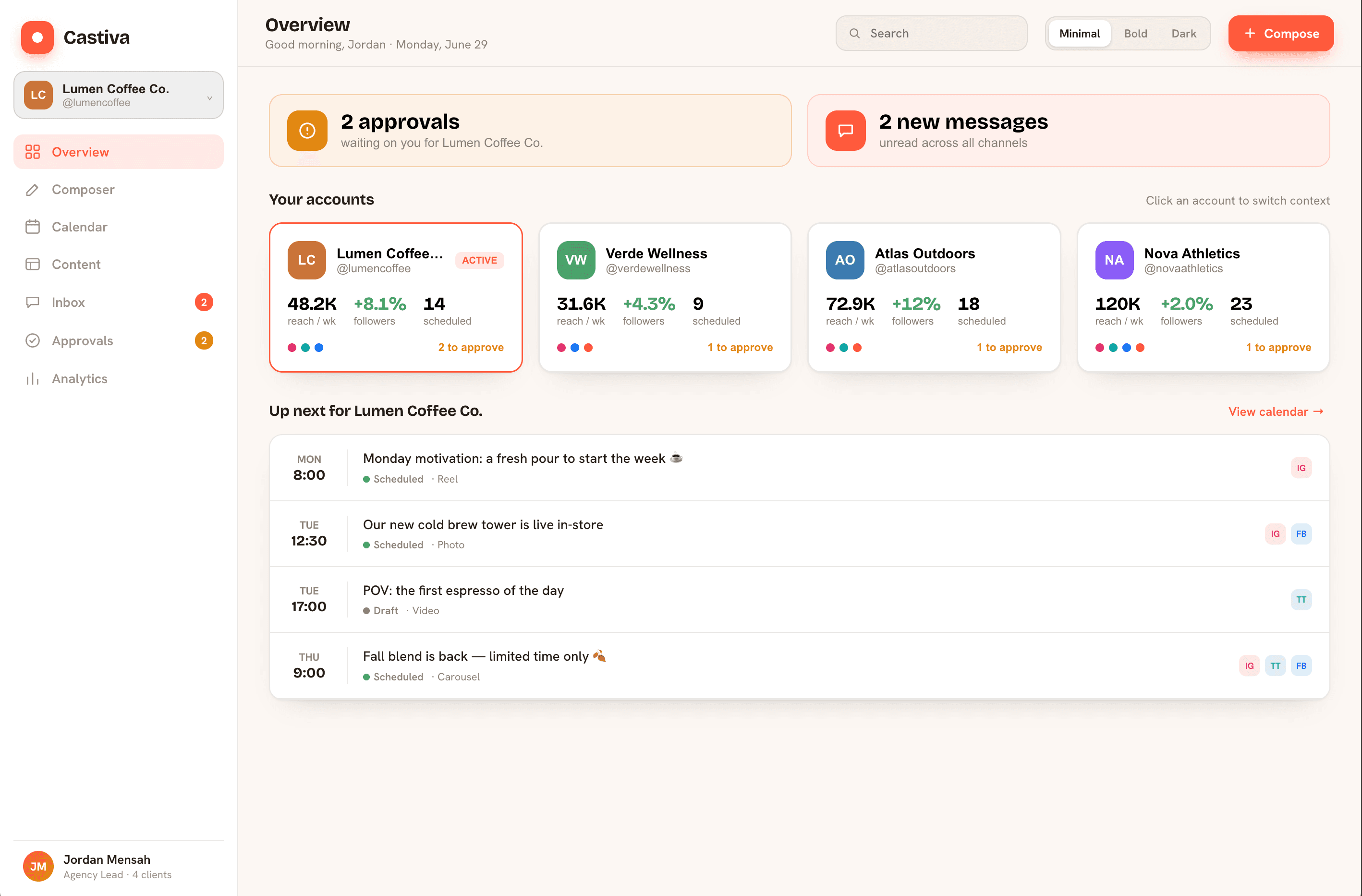
Castiva overview dashboard

Illustrative dashboard with sample data

FacebookInstagramTikTokX
Approved for publishing by Meta and TikTok
What you get

Keep each client’s work together

Every client gets a voice

Save each client's tone, topics to avoid, colors and hashtags. Castiva uses those guidelines to help you create distinct content for each brand. Review and edit the result before publishing.

Green Bowl Café · warm, neighborly, no discounts
Nova Athletics · bold, second person, no emoji
Meridian Legal · formal, precise, no hashtags

A calendar you'll actually enjoy

Plan your week in one calendar. Recommendations and best posting times are available on eligible paid plans.

MON
TUE
WED
THU
FRI

Every client, one dashboard

Switch brands in a click — each client keeps its own calendar, library and numbers. Nothing gets mixed up.

GBGreen Bowl Café · its own calendar
NANova Athletics · its own library
And everything else you'd expect

Scheduling and drafts · media library with reuse tracking · per-client insights and best posting times · team seats and roles · audit log · GDPR and DPA ready

Simple, friendly pricing

Pick a plan and start posting. Switch or cancel anytime.

Free
Your first workspace
1 client · 2 channels · 1 seat
✦ 30 AI points/mo
No credit card required
€0/mo
Start free

Paid plan details are temporarily unavailable. Please check again shortly.

Every plan is month-to-month · Switch or cancel anytime

A few things to know before you start

What counts as a client, channel or seat?

A client is a brand workspace. A channel is one connected social account: one client with Facebook and Instagram uses two channels. A seat is a workspace member, including you.

Can I start without paying?

Yes. The free plan needs no credit card. Its client, channel, seat and monthly AI limits are shown above. Creating an account does not start a paid subscription.

What can I make with AI points?

At current rates, one copy generation costs 10 points and one standard image generation costs 20 points: 30 points for one of each. Revisions, other operations and different models may cost additional points. This is an operation example, not a guaranteed finished-post allowance.

Do my AI points roll over?

Monthly plan points reset on the first of each month; unused plan points do not roll over. Purchased points stay in your balance. The app shows the points cost before generation.

Does AI publish automatically?

Generating content does not publish it. You review the result and choose to schedule or publish. Authorized operators can publish directly; team review is an optional workflow.

Who can review posts?

Team review workflows are not currently available for general signup. You can still review and edit your own drafts before publishing.

Which accounts can I connect?

Castiva supports Facebook Pages, professional Instagram accounts linked to a Facebook Page, TikTok and X. Available formats and publishing permissions vary by network. LinkedIn and Google Business Profile are not supported.

How am I billed?

Paid subscriptions are billed monthly in EUR. You can manage cancellation and plan changes in billing settings. If a smaller plan has lower limits than your current usage, you will need to reduce that usage before switching.
Create your next client post.

Start with one client and one real brief. Review the result, make it yours, and choose when to publish.

Get started